In the BHHC Safety Center Online Training Portal, you can place users together within individual groups. Users are added to a group manually. Once you create a group, you can add the group to a course or program. Any users already in the group will be assigned that course or program, and any users added later will also receive it. In this way, you can create a whole curriculum that works automatically.
If you want to create a dynamically created group defined by group rules, then you'll want to create a Smart Group.
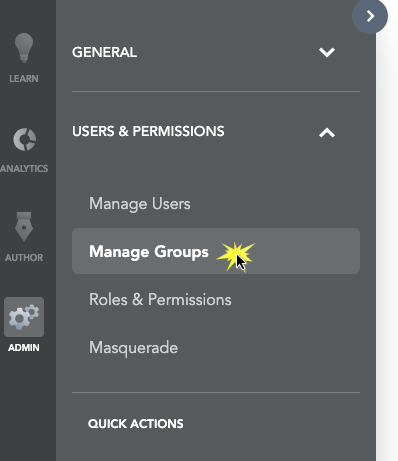
First, we'll need to head to the Admin section.
Next, we're going to open up the Manage Groups section.
In the Users and Permissions menu, click the Manage Groups link.
Finally, it's time to create the actual Group itself.

On the Groups page, click the Add New Group button [1]. Click the Add New Group option [2].
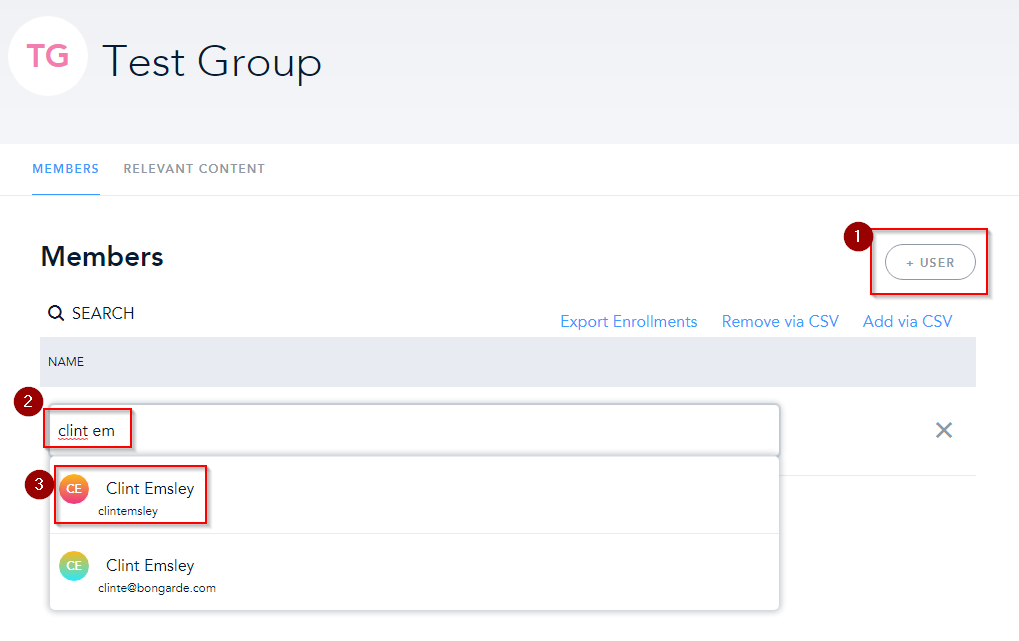
On the page that comes up, type in a title at the top. You can then start adding users.
Was this article helpful?
That’s Great!
Thank you for your feedback
Sorry! We couldn't be helpful
Thank you for your feedback
Feedback sent
We appreciate your effort and will try to fix the article