The online training portion of the BHHC Safety Center sends out notifications for quite a number of events. You can take total control over this, however, and choose exactly what emails get sent out.
Note that not all users have the ability to edit notifications.
To get started, go to the Application Switcher and click Admin. From there, click Account Management, then Notifications.
This will bring you to a screen showing you all of the notifications that SafetyNow sends out, along with a brief description. Let's check out the overall settings first though.
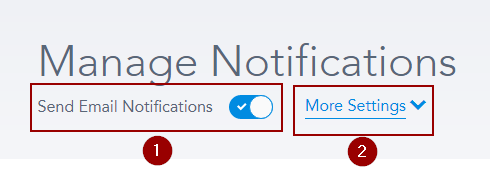 Send Email Notifications [1] will allow you to turn on or off all emails that BHHC Safety Center Online Training Portal sends out. Clicking on More Settings [2] will allow you to change where the emails come from and who your learners will reply to:
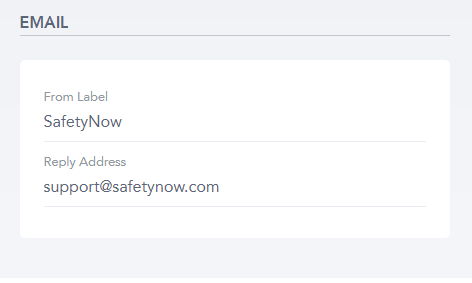
The From Label can be anything, like a name, company name, etc. The Reply Address has to be a valid email address - anyone who replies to an automated BHHC Safety Center Online Training Portal email will send their reply to that address.
And that's it! There are tons of settings on this page, so explore and let us know if you're not sure what an email is.
Was this article helpful?
That’s Great!
Thank you for your feedback
Sorry! We couldn't be helpful
Thank you for your feedback
Feedback sent
We appreciate your effort and will try to fix the article