Retain is a tool that helps learners recall information from their courses and can be enabled for any native SafetyNow course. Learners will receive notifications for six quiz exercises that consist of up to five quiz questions from the original course along a set schedule after course completion. Once each exercise has been completed, the learner will see their current retention rate compared with the Forgetting Curve. The aggregate retention rate of everyone in the course can be compared against the Forgetting Curve to evaluate whether content is being retained on an ongoing basis.
Important! The retain feature is only available for courses built in the SafetyNow Bridge platform.
First, open the Application Switcher

In the Global Navigation menu, click the Author menu option.

On the Courses page, click the name of the course.
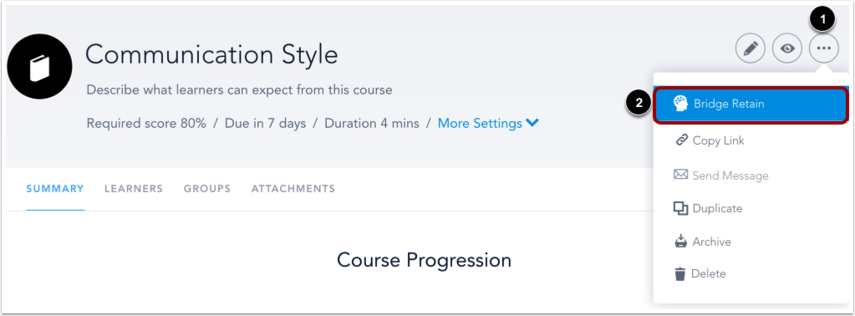
On the Course Details page, click the More Actions icon [1] and then click the Bridge Retain link [2].

Click the Bridge Retain toggle button [1].
Click the Learn More link to view a tutorial on Bridge Retain [2].
Learner View
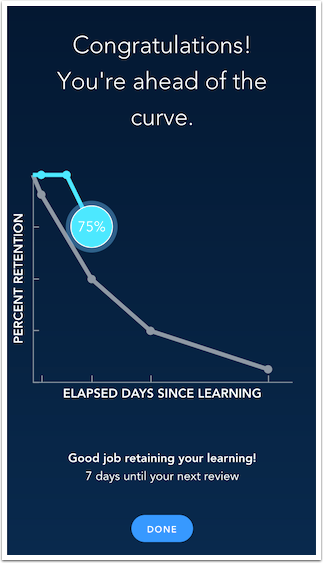
Once enabled, learners will receive six prompts to complete a series of follow-up quizzes on a set schedule after they have completed the course. Each quiz will contain up to five quiz questions randomly selected from the course. Short Answer quiz questions will not be included. The quizzes will be distributed to the learner using an email notification on the 1st, 3rd, 7th, 14th, 21st, and 28th day after successful course completion. If a learner does not complete a quiz within 48 hours of the notification, the quiz will expire and the learner will not be able to take the quiz. Learners will see their retention rate compared with the Forgetting Curve after completing each quiz.
Was this article helpful?
That’s Great!
Thank you for your feedback
Sorry! We couldn't be helpful
Thank you for your feedback
Feedback sent
We appreciate your effort and will try to fix the article